Se afișează postările cu eticheta imaging. Afișați toate postările

Real-Draw Pro

Real-Draw Pro

Real-Draw Pro will look familiar to people who have used similar programs in the past. With suitable tools for creating digital drawings, Real-Draw Pro attempts to set itself apart from the pack with a few added options, but may be over the heads of novices.

This download looks more complex than Paintbrush, but less confusing than more professional programs like CorelDRAW. People familiar with either of those programs will instantly feel at home with Real-Draw, thanks to its traditional interface. The center of the screen is dominated by the drawing space, while the left side holds all the drawing tools, the right features the more complex controls professionals desire, and the middle offers fun options for creating textures and even 3D lighting. Drawing with Real-Draw Pro is both intuitive and slightly confusing. People will be pleased with the single, smooth step for selecting a tool from the left side menu and using a mouse to create the design. The menu along the right side will be a slight snag for novice users, since options like Bevel, Layer, and the program's confusing color chart seem intended for those with professional training.

Even though some of the options are confusing, creating art with Real-Draw was very simple and people should have no problem finding an immediate comfort zone. This 30-day trial offers a little something for everyone and makes a fine download.

HP Photosmart Essential

HP Photosmart Essential

HP Photosmart Essential provides a simple set of tools for editing and sharing photos. While not offering a ton of options and functions, the program does a fine job of sticking to the basics.

We were surprised by how simple and professional-looking the program's interface was and it was clear the designers put a lot of effort into it. That was even before we watched the brief tutorial videos that showed us everything we needed to know. The program reminded us of many other photo editors, though with only a handful of tools, like color, lighting, resizing, and cropping. The changes provided slight alterations, but not a complete overhaul of a shot. Frankly, we appreciated how this program avoided throwing a number of complicated masks, filters, and alteration tools, because it kept us focused. The program also provided ways to e-mail pictures or even place them on a sharable folder that your friends can access online. On top of all this, the program offers a feature to download tools to make cards and calendars with our photos. The program offered no frills, but its interface and simple results were enough to convince us that this is good for photo fans.

HP Photosmart Essential is a freeware program. It comes as a compressed folder, installs desktop icons without permission, and left folders behind after uninstall. While this program doesn't offer a galaxy of editing options, its basic setup is good enough for us to recommend it.

Ai Picture Utility

Ai Picture Utility

AiPICT views, edits, enhances, manages and organizes photos -- plays multimedia too. Are your digital photos "greenish", too dark, dull, spotty, washed-out or overexposed? its professional image processing and conversion procedures easily empowers the digital photo enthusiast with the ability to correct images with features found only in expensive commercial apps; these include variable equalization and remapping, unsharp mask, masked bitmap operations, contrast restoration. Tweak your photos into "perfect pictures" with its Imaging Lab. Its huge set of imaging functions can be scripted in unlimited combinations to enhance any picture. Apply lab commands to similar photos or process millions of photos as a batch. Has you picture collection grown and become unmanageable? Quickly thumbnail entire drives (or offline CD/DVD volumes) and organize images by visual content, date, size, or keyword. Use handy batch functions to unzip, save, convert, rename (by date or sequence), move or delete millions of images - unattended! Thumbnail entire drives and organize images by visual content (or date, size, keyword) with the Slide Album. Find and remove duplicates; proprietary image analysis can even quantify and rank picture quality. Take charge of your multimedia presentations with the AVL Remote Control. Create or distribute slideshows on DVD/CD with choice of 173 cool effects, variable delays, windows-in-windows, gamma, background color, rotation, comments and other properties, per slide. Format support includes PNG, PhotoCD, Photoshop, GIF, BMP, PCX, TGA, WMF, DCX, Multi-page TIF, MP3, FLAC, APE, OGG, MP4, WAV, AVI, MPEG, MIDI, CD audio, WMV, WMA, MKV ... Its speedy viewer is unmatched and includes widescreen and other zooming options. Common imaging tools include "red eye" removal, EXIF, fast wallpaper, variably-sized and positioned prints, smooth resizing, rotate-by-degree, borders, image text.

Abrosoft FantaMorph Pro

Abrosoft FantaMorph Pro


What struck us even more than Abrosoft FantaMorph Pro's enormously elegant and straightforward interface was how well the friendly project wizard and tutorials put the advanced animation software within an amateur's reach. Powerful but easily applied tools seamlessly morph sequences of two or more images while providing an instant preview. The color cycle tool, for instance, eases the marking of key points on each image in the sequence by turning the default green dots into a rainbow spectrum, making it easier to distinguish the placement of individual points on the corresponding images.

User controls dictate frame length, morphing style, and one of seven video-export formats, including AVI, Flash movie, and screensaver. Conferring a professional polish and pleasing intermediate-to-advanced users is a selection of additional dramatic effects like lighting, masks, curves, and filters. Note that the demo version prints a watermark on all output--a common trial restriction on programs of this breed.

Ulead Photo Explorer

Ulead Photo Explorer


It's hard to match the selection of features in this product. The user interface makes it easy to view and organize images. Ulead Photo Explorer provides an admirable CD cataloging feature and lets the user share VCD/DVD files. The program works smoothly downloading images from both digital cameras and scanners. On the downside, the download takes a long time. Also, the program permanently attaches files to your system, write-protecting them in the process. This makes it difficult, if not impossible, to remove the software from your operating system. On top of that, there is no uninstall program, and data miners are included in the executable program file. Ulead Photo Explorer is easy enough for the beginner to use while providing enough advanced features to satisfy the expert, but users will have to decide whether its features offset its drawbacks.

ACDSee 14

ACDSee 14


ACDSee 14 has everything you need to take control of a growing photo collection, perfect and add the latest effects to your images, and share your memories with friends and family. Quickly find and organize photos, perfect them with easy-to-use editing tools, and unleash your creativity with super-simple special effects. Then share your images through e-mail, social media or your own 10GB space on ACDSee Online.com.

What's new in this version:

Map view and Geotagging Support. Find and organize your photos by location with new Map view and geotagging support.
A new metadata panel includes custom views, letting you see only the data that's meaningful and to you.
New Collage Effect to creatively display your photo in a collage of prints.
New Orton Effect to give an ethereal, pastel-like touch to your portraits and landscapes
New Lomo Effect to produce an edgy, retro feel.


Adobe Premiere Pro CS5.5

Adobe Premiere Pro CS5.5


Adobe Premiere Pro CS5.5 software offers breakthrough performance for video production, enabling you to work dramatically faster thanks to the revolutionary native 64-bit, GPU-accelerated Adobe Mercury Playback Engine. Work natively with the video formats you want and accelerate production from scriptwriting to editing, encoding, and final delivery.

Tap the power of tapeless workflows-- Save time with industry-leading native tapeless workflows, which eliminate transcoding and rewrapping, while preserving the pristine quality of your footage. Capture and log footage from virtually any camera--including tapeless cameras--with Adobe OnLocation CS5. Work better with other NLEs--Import and export Apple Final Cut Pro and Avid projects in Adobe Premiere Pro so you can explore new possibilities with After Effects, Photoshop, and other Adobe software, bringing timesaving integration between Adobe tools to projects created in these other NLEs. Move faster from script to screen--Move from script to screen faster with Adobe Story, a new Adobe CS Live online service that integrates with Adobe Premiere Pro. Import scripts from Adobe Story to create shot lists, align scripts to footage and produce rough cuts, and then optimize video to create engaging online experiences.


Free Picture Resize Starter

Free Picture Resize Starter


This program aims not just to resize images but to optimize them for particular purposes. Picture Resize's interface looks welcoming, and the minimal help displays right in the interface. A pull-down list lets you resize images to make them suitable for e-mailing, burning to a photo disc, displaying in an instant-messenger program, or publishing online. The Make It Fit utility helps you find image parameters that will create a file of a specific size.

The program also helps you instantly resize multiple files. You can set the Custom option easily, though apparently you can't edit the presets. However, you will find a built-in image editor with basic features, such as drawing tools and a rotation utility. The included tools for creating slide shows and icons are fairly basic, but we consider them nice bonuses.

Folks looking for an easy-to-use image-resizing application with a few useful extras should give this one a try.


Photobie

Photobie


By providing normal editing techniques and adding some unique twists, the free Photobie takes aim at its higher-priced competition. Although novices will be overwhelmed by the numerous options, the program proved to be a very good image editor.

This freeware program even emulates more popular apps like Photoshop in its presentation and interface. The screen is dominated by a generous space for the picture to be touched up. Along the top are simple, colorful icons for saving, starting new projects, printing, and the like. Along the right side is a color palette with a box of tools for color fill, creating lines, and other basic options. In addition, a separate box monitors each of your steps and lays them out in order for users to keep track.

The most unique additions are embedded in a gray bar at the very top of the program. Here you can create a 3D cube, make a screen capture, and actually produce GIF animation with your picture and changes. The animation is a little hard to master at first, but proves to be a lot of fun. We don't recommend this program for those new to image editing, since it may be over their heads, but old pros will find a lot to love with the free Photobie.

The Logo Creator

The Logo Creator


This program's title speaks volumes about its purpose: The Logo Creator includes many templates for developing logos or modifying existing ones. However, the tool's time-consuming download and complicated functionality are hard to slog through.

First, the big 34MB installation takes a while to load, since it includes an enormous amount of PNG and JPEG files. Then you have to set aside more time to actually launch the program. In our tests, we managed to do that only after one hour of desperate attempts. However, designing logo has been made easier thanks to the "element setter".

Fortunately, your troubles won't all be for naught--the highly varied and customizable features can help you build a unique logo. Then, you can save the log as a template for re-use. However, the program is still too simple for professional logo makers, not to mention entirely too frustrating for those who wish to generate a logo quickly and easily.

Pandora Recovery

Pandora Recovery


File recovery has never been easier thanks to Pandora Recovery. The program's wizard-like approach to finding and retrieving lost files will appeal to all users.

The user interface is about as straightforward as it gets. Clean and simple menu and command buttons run across the top of the paneled window, while a tree-menu containing hard-disk folders to browse resides in a sidebar. But what stood out the most was the program's wizard, which walked us through the process of locating long-lost files. It first prompts you to check your Recycle Bin, which sounds obvious, but is a necessary time-saver. The program has three search settings (Browse, Search, Deep Scan) and each has its own description so that you'll know which to choose. Depending on the search setting you select, the program's interface changes to accommodate the search. We started with a Deep Scan, which detects deleted file types. Once we selected the file types to include in the scan (All, Images & Photo, Archived Files, Music & Sounds) the program immediately went to work scanning our hard disk. Considering the task at hand, the program quickly pulled up deleted files.

We liked the quick help links located throughout the interface to answer specific questions, but the program does included a very thorough built-in Help file. Our only complaint is that it left files that had to be manually deleted during uninstallation. However, we highly recommend this free program for any user looking to quickly locate a lost file.


Adobe Photoshop Lightroom

Adobe Photoshop Lightroom


The bottom line: Critical enhancements in areas like noise reduction, video handling, and printing make Adobe Photoshop Lightroom 3 a recommended upgrade for most current users.

For the uninitiated, Lightroom is Photoshop's specialized sibling; where Photoshop is an imaging Swiss Army Knife, Lightroom is a steak knife for photographers. Like its most well-known competitor, Apple Aperture, you use it to organize, process, nondestructively retouch, and output volumes of raw files. Now with version 3, Adobe enhances the product in some critical ways that make it a significant upgrade over version 2.x. There's pretty much something for everyone here, including improved performance, killer noise reduction, potentially powerful export tools, and extremely flexible printing options.

Installation and interface
Lightroom is a much faster, lighter installation than Photoshop. You can choose to purchase a license key immediately, which you will receive by e-mail, or try out the program for 30 days. When you receive your key, you can copy and paste the entire string directly from your e-mail into the first dialog box, and the other boxes will automatically populate. There's a 164MB download for Windows or 77MB on a Mac. Like most of the applications coming out of Adobe these days, it uses the Adobe AIR installer.


Adobe Photoshop Elements

Adobe Photoshop Elements


Now in its 10th year, Adobe Photoshop Elements 10, which also comes as a bundle with its video-oriented sibling, Adobe Premiere Elements 10, offers photo enthusiasts and beginners a lot of imaging power for a lot less than its big brother. This version brings parity to the Mac for Organizer search, expands social tagging capabilities, some basic video support and path text, as well as enhancements to a few existing tools. It's a basic update that doesn't radically change the usability or capabilities of the program unless you shoot raw--and that's because it updates to the latest engine of Adobe Camera Raw. (However, if you do a lot of raw shooting, I recommend you try Adobe Lightroom instead.)

First, Adobe has beefed up the Organizer a bit to improve its video support, since it's serving Premiere as well. It allows for hierarchical tagging, as well as Smart Tags, which can automatically classify your media as high, medium, or low quality, as well as tag what it thinks is in focus, low contrast, blurred, and so on. This can be hit or miss; for instance, it classified a host of photos with shallow depth of field as out of focus. The new object search works reasonably well on rectangular objects--for instance, I used it to try to isolate the photos of cage cards--but not so well on others. It can search based on shape or color, and you can control how the two are weighted. There's a new Duplicate search based off the visual similarity engine, but it performs too inconsistently to rely on it. Plus, if you shoot raw+JPEG, it counts every pair as a duplicate. In general, PSE doesn't handle raw+JPEG well at all.

That said, if you're using the search tools to find images with a certain feel or color scheme to use in projects, the visual similarity search will suit.

From the Organizer you can do quick fixes, launch project creation, or share to a variety of popular sites. The Facebook integration comes in the People recognition view; there, you can download your Facebook friends' list to tag, so they upload pretagged; you can upload full or reduced resolution. New is YouTube uploading--it can directly upload unedited videos.


Adobe Photoshop Extended

Adobe Photoshop Extended


The bottom line: Photoshop CS5 greatly expands the toolset that Adobe offers in its flagship product, charting new ways to make image manipulation easier while making older tools work better than before. Don't worry about the lack of a new interface; the new ways to get your project done make this version a must.

Photoshop has been in the English lexicon as a term to edit images for a long time, but the latest version of Adobe's flagship program stretches the canvas of manipulation much further than ever before. The look of the program has changed so little from Photoshop CS4 that users of that version should be instantly comfortable with this major update, but Photoshop Creative Suite 5 Extended gives photographers, artists, designers, and LOLcats obsessives a stunning array of new tools. Among the new features in Adobe's flagship image-editing software are automatic lens corrections, High Dynamic Range toning, automated editing tools, and significant improvements to creating 3D images.
Adobe Photoshop CS5

Installation and setup
Photoshop installation is straightforward, although it does require an Adobe account. You can choose to purchase a license key immediately, which you will receive by e-mail, or try out the program for 30 days. When you receive your key, you can copy and paste the entire string directly from your e-mail into the first dialog box, and the other boxes will automatically populate. Both Photoshop CS 5 and the Extended come from the same 980MB installer for Windows, or 1.1GB on a Mac.

Depending on your Internet connection, Adobe says that users can expect download times of anywhere from 14 minutes on a corporate LAN to nearly 90 minutes on slower connections. On a Windows 7 computer with 2GB of RAM and a 2GHz processor on a T1, the download took around 40 minutes.

The Adobe installation process doesn't play well with Mozilla programs such as Firefox and Thunderbird, so those must be shut down before the installation can be finished. You can use other programs while installing, but CPU slowdowns are likely on many computers.

Adobe still refuses to have a Windows installation process that's respectful of standard program installation behavior. Associated program icons do not install into an Adobe folder in your Start menu, but are rather unceremoniously dumped into your Start menu's All Programs pane. First-time upgraders should note that Adobe will not override your previous installation of Photoshop, so you'll have to remove it manually. This may be annoying to some, but it's actually reasonable behavior given the cost of the program and the desire of many users to fully explore the trial. It would be nice if Photoshop came with a utility for removing previous versions, instead of having to go through the imperfect Windows uninstallation tool.


FastStone

FastStone


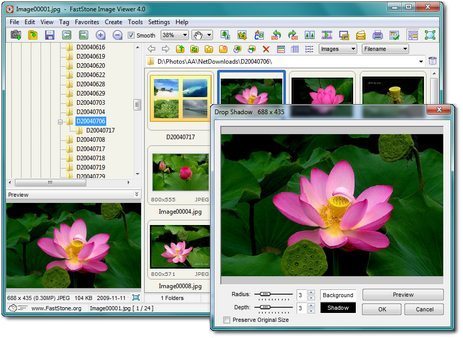
An image browser, converter and editor that supports all major graphic formats including BMP, JPEG, JPEG 2000, GIF, PNG, PCX, TIFF, WMF, ICO, TGA and camera raw files. It has a nice array of features such as image viewing, management, comparison, red-eye removal, emailing, resizing, cropping, color adjustments, musical slideshow and much more.

InkScape

InkScape


you need to download the right installation file from the Inkscape download page. Note that this page has a separate version for Panther (10.3.9 only), and Tiger (10.4.x) and above. The Panther version is PPC only, while the Tiger version is Universal Binary, meaning it installs on either older PPC or newer Intel Macs. The Tiger version will also work on Leopard (10.5.x)

XnView

XnView


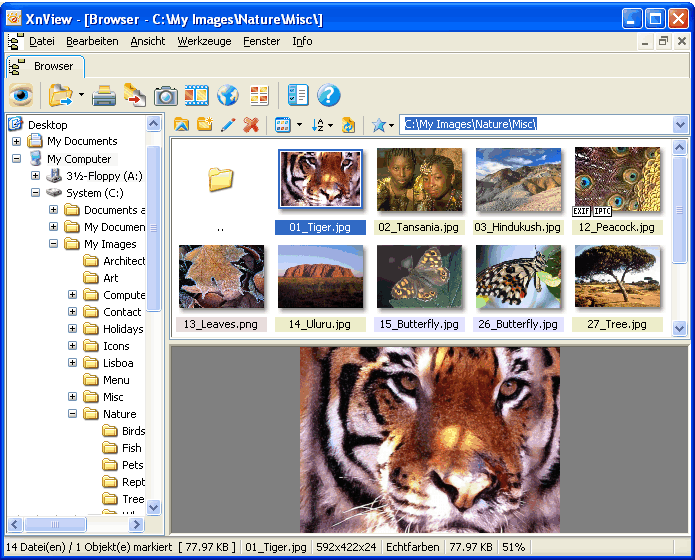
XnView & NConvert are provided as Freeware for private non-commercial, educational use and non-profit organization. Commercial use is not authorized without agreement or ordering.


IrfanView

IrfanView


Windows Photo Viewer is an excellent application for all those who want just that, open pictures without wasting their time.

But IrfanView is great in so many ways that we can hardly name just one. It perfectly replaces the tool bundled into Windows to let you browse photos but it offers a lot more than that.

Installing IrfanView might be a bit difficult because it prompts you to choose the files you want the application to handle, so in case you just wish to use it as your backup solution, be sure to uncheck them all.

Besides the fact that it’s perfect when it comes to opening virtually all formats out there and letting you browse through your photos extremely easy, IrfanView can also do conversion and resize on the go.

GIMP

GIMP


The volunteer developers of The GIMP have been working hard to develop a polished, user-friendly, and freely distributed image editor. Although the separated palette windows may disturb those users who are used to more traditional layouts, your comfort level should grow exponentially as you discover how pain-free the program is.

One of the most powerful general-purpose image editors around, the upgrades make the GNU Image Manipulation Program eminently comparable to Photoshop. Older features include channels, layers and masks, filters and effects, tabbed palettes, editable text tools, perspective clone, improved printing, and color operations such as levels. New improvements include GEGL integration for 32-bit color support, dynamic brushes, and more options for the free select tool. It even has regex-based pattern matching for power users.


Picasa

Picasa


When it comes to photo viewers there are many alternatives to choose from. Picasa has always been a favorite here at Softonic, and this new version has made it our absolute top choice.