Se afișează postările cu eticheta media. Afișați toate postările

Winamp Lyrics

Winamp Lyrics


This plug-in lets you view song lyrics when using Winamp, but it seems like a less-attractive option than many of its competitors. For starters, Winamp Lyrics only supports the jukebox found in its name, neglecting other popular choices. The application's lyrics pane can be accessed from Winamp's View menu, but strangely enough, if you turn it off, you'll have to restart the jukebox to find it again. Changing the plug-in's preferences also is a hassle, requiring you to dig through Winamp's menu items. Customization options aren't expansive, but you can change the font, color, and format of the displayed lyrics. As soon as you click a tune, Winamp Lyrics will retrieve the words from the Web and either save them as a TXT file or embed them in the MP3. In our tests, performance was decent, though the application failed to retrieve the words to many of the obscure tracks in our collection. Dedicated WinAmp users might find some benefit here, but hard-core music fiends have better options at their disposal.

Ares Destiny

Ares Destiny

Ares is a p2p program giving users access to the Ares & BitTorrent networks which allows users to download Ares files for free. Ares is mainly used to download music and videos and with the free Ares download, you can fill your itunes and ipod for free

A quick-search feature locates your files by typing in the keyword of the file you are searching for. Ares allows you to preview files while their download is in progress and organize a playlist made of your favorite files. The Ares download player supports internet radio as well, so if you want to listen to your favorite internet radio station while downloading your favorite tunes, it's very simple. You can host your chat room and join other available channels.

Your shared files are organized into specific categories in the library section of the Ares download software, making it easier for you to find the files you are looking for. You can sort your files by type, category and easily change your shared settings via the Ares control panel. Ares has a handy quick-search feature that locates your files by simply typing in a keyword.

MP3 Rocket

MP3 Rocket


MP3 Rocket is an award winning YouTube Video to MP3 Downloader that allows you to download videos and convert them to MP3s, including HD and HQ videos. Also allows conversion to other HD video formats. With MP3 Rocket you can download free mp3 music downloads, watch TV, movies and play free games. MP3 Rocket also includes precise categories and genres, popularity and voting tools, making it easy to find and enjoy the entertainment youre looking for. MP3 Rocket uses sophisticated and proprietary under-the-hood technologies to optimize and accelerate download speeds. MP3 Rocket is easy to use, just search for the video or music you want, then just click Download. The software also allows you to convert downloaded videos for iPod, iPhone, PSP, Cell Phone, Windows Media, XVid and MP3. Also provided the ability to auto-import into iTunes the songs and videos you have downloaded. MP3 Rocket is spyware and adware free, and provides the industrys most aggressive protection to block harmful content, keeping you and your computer safe. Along with its fresh, intuitive interface, MP3 Rocket combines powerful YouTube download and conversion technologies with effortless live channel streaming to give you the worlds easiest entertainment experience with the least amount of hassle. Judge for yourself, test out a free version of MP3 Rockets YouTube downloader today.


VideoSlurp YouTube Downloader

VideoSlurp YouTube Downloader


YouTube seems to have become a way of life for many Internet users. The worldwide video-sharing network is among the most popular sites anywhere. VideoSlurp YouTube Downloader promises to let users save their favorite films to their hard drive and view them whenever they want.

This free program isn't much to look, but its performance makes up for that. A simple start-up screen explains the program and how to operate it in about four short paragraphs. From there, the tool is very intuitive. A row of icons along the top of the screen allows users to navigate the Internet and download. However, the most important area is the search box where users type in any topic, which lets VideoSlurp to automatically search YouTube for content. Once a video is located, simply click on the download icon at the top of the screen. A small status area at the bottom of the screen tells you what percentage of your video has been downloaded.

Once complete, videos are saved in the obscure FLV format. Most computers will not support this and won't let you watch your videos. It is a minor inconvenience to download the necessary tools to watch your content, but luckily VideoSlurp walks you through either downloading a converter to change FLV files or to get an FLV viewer for your movies. Overall, this is a neat download that YouTube lovers will get a lot of use from.


Vuze

Vuze


Formerly the feature-rich Azureus, Vuze takes Azureus' BitTorrent foundation and builds on top of it a network for video discovery and user-created video publishing tied together by social networking.

From XML torrent options to IP filters, firewall tests to UPnP plug-ins to baked-in social networking, Vuze isn't breaking new ground--the original BitTorrent client has gone this path, too--but it is doing it in an innovative and attractive way. When you install the program, you're faced with an interface that will be instantly familiar to iTunes users. In providing a general overview of their torrents and media playback controls, the new layout emphasizes user-initiated searches.

The Advanced tab has been replaced by My Library. The old Azureus is now completely gone, but because of the demands of users, Vuze 4.0 is much closer to the intent of its progenitor than Vuze 3.1 was. A simple, three-step guide that launches when you start Vuze helps you get acclimatized to the new Vuze. There's still work to be done: memory usage is up around 100MB, and although you can set up private trackers, you can't customize the search box. People new to torrenting or only interested in sharing media files might appreciate this visually active approach.


SMPlayer

SMPlayer


On the video-player spectrum, SMPlayer is somewhere between the full-bodied Miro and the super-lightweight VLC Player. The freeware player, intended to be a front-end for MPlayer, supports an impressive list of features and options.

The list of supported formats encompasses both major audio and video codecs and does a good job of trying to differentiate itself from the competition. One of the best features is that the player will remember your settings per video, so if you quit the app in the middle of playing, it'll restart it with the exact same settings as before. Subtitles are fully customizable, including color, font, and size, and it can stream in content from the Internet. The app also works on both Windows and Linux, and it's supported in more than 20 languages. There's also a karaoke filter, so you can remove the audio track.

As you might expect, the install file is quite large at 17MB, and it takes up a fair bit of RAM. We experienced no stability issues with the program, so we're quite comfortable in recommending it as a strong secondary player or even a primary, if one of its more esoteric features is just what you need.


MPlayer

MPlayer


This is an unofficial MPlayer packages based on Cygwin. These packages are made from CVS copies of MPlayer with a custom patchset applied. Primary features of MPlayer: DVD player; independance from third party codecs (no need to download from DivX.com to watch DivX movies); supports the same wide variety of files as MPlayer under Linux; the same great performance you expect from MPlayer.


Bs.Player

Bs.Player


Several years ago, BS.Player used to be one of the better multicodec free video playback applications around. It then started to be bundled with adware, popularity dropped, and other programs took up its slack. BS.Player returns now with a free version, a new interface, and new jukebox capabilities for video and audio.

The interface loads as a refurbished skin of the original dashboard, and you can even reskin the it back to its original look. Track name, length, and time elapsed are front and center, and clicking on various features, such as the elapsed time, cycles through display options. Note that the Menu tab is hidden until you mouse over it. Player controls live at the bottom, and a tab of gray options on the right expands to reveal further options for Video, DVD, Audio, Radio, and TV playback. Three circles marked ML, PL, and EQ toggle the detached Media Library, Playlist, and Equalizer panes.

The installation process checks your system for missing codecs, although you have to opt out of a BS.Player toolbar. We had no issues drag-drop-and-playing various Real, Quicktime, AVI, WMV, and MPEG-formatted videos. Also note that the new Media Library window owes much to iTunes. There's not much you can do about that, since the included skins only change the look of the dashboard. BS.Player lacks modern ancillary media functions such as seeking out album art, but you can configure ID3 tags natively. If you're feeling nostalgic for a stable media player with a familiar name but updated look and features, you can be bullish on BS.Player.


QuickTime

QuickTime


After 10 years and with millions of users worldwide, Apple's QuickTime player still provides one of the best solutions for digital media. Whether you're watching streaming movie trailers online or diving headlong into QuickTime as a creation platform, you'll find little to quibble about in this veteran player.

Its few quirks are quickly offset by the elegant Apple interface and the top-notch audio/video playback quality. QuickTime 7 comes in two varieties. The free standard player handles popular audio, graphic, and video formats, including the much-ballyhooed H.264 and MPEG-4. Also, for $29.95, you can upgrade to the content-creation-friendly Pro version, which adds features such as full-screen playback, easy editing, H.264/MPEG-4 production, and the ability to save movies from the Web.

MPEG-2 support is available, but at an additional cost of $19.95.High-definition content looks impressive with the new H.264 codec, but hardly better than with similar offerings from Microsoft. The stylish transport controls and the friendly layout work well. Inclusion of the autoupdate and automatic-network-detection features make getting started and staying current easy.


MediaMonkey

MediaMonkey


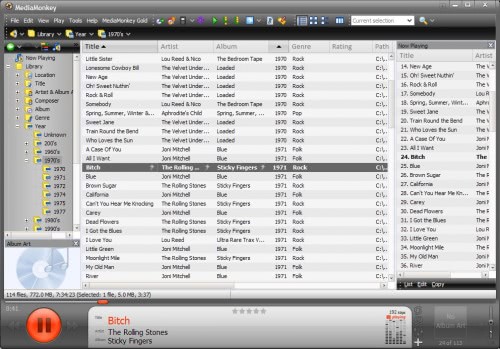
Despite a glut of free player/encoders, it's tough to find one that meets our expectations. Formerly known as Sound DB, MediaMonkey has excellent library-management tools that keep the largest digital music collections well organized. Stir that up with integrated CD and DVD burning, a stellar interface, a full-featured encoder, and the ability to sync with portable audio devices such as the iPod, and you have a pretty compelling product.

Upon first launch, the program scans your drive for supported digital media files to add to the library. Files are sorted based on their ID3 tags, and the helpful Auto-Rename and Auto-Tag From Filename features keep untagged tracks from falling through the cracks. Party mode locks down your library while still allowing people to request songs. Auto DJ plays selections from your library even when there are no requests in the queue, and the all-important iPod and portable device synchronization works well. Third-party plug-ins are available from the site if you want to tinker with the playback and encoding engine or add additional sound-processing effects. The interface is well designed, with clean, colorful icons throughout.


CCCP (Combined Community Codec Pack)

CCCP (Combined Community Codec Pack)


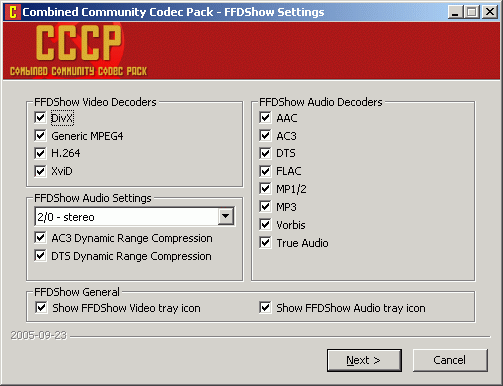
Greetings, Comrades! Free codecs for the people, thanks to the benevolent CCCP. Not the USSR but rather the Combined Community Codec Pack Project, a group dedicated to propagating Windows video codecs to achieve de facto standardization among competing anime formats, many of them developed and used by fan groups. Over time it's grown into a collection of useful codecs for playing just about any kind of video file you're likely to encounter online. The whole point of the CCCP is to provide a comprehensive set of codecs that will not only play common files but also uncommon ones.

It's recommended that you use the CCCP in conjunction with CCCP Insurgent, a separate piece of freeware that identifies any codecs currently installed on your computer so that you can disable them according to the instructional wiki on the Project's Web site. The CCCP is focused on decoding video files, not encoding them, so there are issues with some video production and editing software--for instance, it doesn't play well with some Nero components, and it asks to disable them when you install the pack. However, it's worth the work to see the unusual anime shorts and demos these fan groups produce. The download also includes the excellent 321 Media Player Classic, which works when Windows Media Player won't.


Spotify

Spotify


The bottom line: It's the best free music option since stealing.

Review:

Installation
As a first-time user, you install the free Spotify Mac/PC application, open it up, and watch as it automatically imports your music collection and playlists from iTunes and other music software and presents you with a landing page filled with new releases, top lists, and music shared by your friends. Setup is swift.

Interface
Spotify's polished, iTunes-like interface is as inviting to music fans as a well-stocked record bin. Each portion of the bento-boxlike layout can be resized, and playback, volume, and track scrubber controls are placed neatly across the bottom. Browser-style back and forward buttons located to the left of the search box allow you to dig your way back out out of the rabbit hole of music discovery.

Features and support
Spotify's big trick is a little search box at the top of the screen that lets you search for any reasonably popular artist, song, or album in existence and stream it immediately. You can't get The Beatles, but we had no problem finding greats like The Rolling Stones and David Bowie, as well as obscure indies such as The Ghastly Ones or Four Tet.

Put simply, you tell your computer what you want to hear, and it plays it for you...for free, and without limitations for up to six months. It doesn't play something similar to the song you want (like Pandora), or a 30- to 60-second clip of the song you want (like iTunes)--it plays you the whole song or album, just as if it were in your personal music collection.


GOM

GOM

As various media players jockey for position to become your default setting for music and video streams, GOM Media Player's support for a wide range of file formats has helped it stand out as a firm favorite.

Supported formats include DAT, MPEG, DivX, XviD, WMV, ASF, AVI, and MOV, as are common codecs like FLV1, AC3, OGG, MP4, and H263. A pop-out playlist can save and organize your various media files, though the limited sort modes--two--hardly makes it a champ.

More impressive are the customizable settings on the control panel. Here you can adjust a video's image brightness, hue, and saturation. There's no preview window, and changes occur as the video runs, so unless you care for a rousing session of trial and error, be sure to tweak the settings after clicking "play." There's also a built-in screen-capture feature that includes zooming and panning, customizable themes, hot keys, and a host of preset and adjustable audio controls.


K-Lite Codecs Pack Full

K-Lite Codecs Pack Full


K-Lite Codec Pack Full is a collection of VFW/ACM codecs, DirectShow filters and tools. Codecs and DirectShow filters are needed for encoding and decoding (playing) audio and video formats. The K-Lite Codec Pack is designed as a user-friendly solution for playing all your movie files. With the K-Lite Codec Pack you should be able to play all the popular audio and video formats and even several less common formats.

What's new in this version: Version 8.0 has updated ffdshow to version 1.1.4070, LAV Filters to version 0.40 build 2011-11-21, MediaInfo Lite to version 0.7.51, and Codec Tweak Tool to version 4.1.0.


Audacity

Audacity


With so many audio editors out there, finding the right tool for the job can be tricky. The multiplatform, open-source editor Audacity has leaped to the top of our list with its clean interface, excellent features, and support for 32-bit floating-point audio. Audacity succeeds at being both feature-rich and flexible, while keeping the toolbar and work space uncluttered. It does this by relegating most functions--such as effects, edits, and project management--to handy drop-down menus.

Audacity supports uncompressed audio standards such as WAV and AIFF in addition to OGG and MP3 files. A full complement of basic effects such as reverb, delay, and compression are included. Virtual Studio Technology (VST), Linux Audio Developers Simple Plugin Architecture (LAPSDA), and Nyquist plug-ins also are available if you're looking to expand. Another eye-catching feature is the Beat Analyzer, which helps you peg the beats per minute of a phrase.

The performance of most functions is quick--even CPU-hogging tasks such as exporting to MP3 or adding complex effects. Though Audacity doesn't offer advanced effects or features out of the box, its usability and price set this freeware wonder above the crowd.


Winamp

Winamp


WinAmp took some long-needed steps to improve the old-school media player, with support for AAC encoding, CD burning, and a robust file-management system. WinAmp 5.56 ups the ante with strong support for portable devices, including iPods, the ability to sync non-DRMed files to your PC from your device, an optional new interface layout and a built-in browser for media discovery.

We liked that clicking on an artist's name will get you related headlines and Web sites in a separate pane. There's also Podcast support, device synchronization that lets you tweak the sync list while in progress, and continued support for AOL's excellent Shoutcast. The new Bento layout is worth mentioning, too, because it gets the venerable llama away from the old modular format. The joined panes for the browser, media player, artist list, album list and more make WinAmp instantly more visually appealing. There's also an Auto-Tag feature, which will download metatags from the Gracenote database, and Winamp's proprietary music scrobler called Orgler, with links back to AOL Music.


Foobar2000

Foobar2000


This venerable and free alternative audio player has long been appreciated by hard-core customization enthusiasts, but Foobar2000 isn't just for early adopters or software jukebox fetishists. It doesn't mess with fancy buttons or bright colors, instead preferring a utilitarian, straightforward user interface to let the music speak for itself.

Foobar2000 uses tabs and panels to help the user navigate its plain, but functional, user interface. You can customize the interface using several layout options. Menu options and recognizable command buttons reside at the top of the window. Two panels, each with tabbed menus, reside on the left side of the window. From there, you can view the album list and the properties of a selected artist or song. You'll also find tabs for viewing a spectrogram, a spectrum, and VU meter of music currently being played. The largest panel displays track lists. Using the menu options, we were able to successfully pull music files from a CD, load them into the player, play them without issues, and save them as MP3s or WAVs. You can also display album art, and synchronize with portable players including iPods.


AIMP

AIMP


AIMP provides all the basic tools you'd expect from a media player. However, it evolves into something special once you discover its special features. It supports more than 20 audio formats and 32-bit digital audio, and it converts between various formats, too. You can also customize it with Winamp add-ons.

The program's interface felt instantly comforting. Its professional design is sleek, and all its command buttons are simple to navigate. We never felt confused or lost enough to require a visit to the Help file. The program's functionality isn't anything special because it simply lets you upload MP3s and play CDs using its standard controls. We had no problems doing either, and we were pleased with its crisp sound quality. However, this program came into its own with its lush variety of features. Its 16-band graphic equalizer was nice, but we only noticed a difference in sound when we used the presets. It also offered an Auto Shutdown feature where we could customize the time limit and action for shutting the program down. Most impressively, there was a feature for recording online radio, just like holding a tape deck up to the stereo in the old days. With all its pieces adding up to a superior product, we enjoyed every minute of using this program.


KMPlayer

KMPlayer


Despite lacking a Help file, KMPlayer is one of the most powerful freeware video players we've seen. It includes a vast array of video- and audio-capturing options, as well as skins, a plethora of playback controls and tweaks, and broad DVD support.

You'll have to learn the ropes yourself, perhaps a hindrance to newcomers. But if you're familiar with where things ought to be in programs, and willing to patiently wait for mouse-over labels to pop up and then click on them for the actual menus, KMPlayer has the potential to be immensely rewarding. It supports all major file formats, and all of the minor and obscure ones we tested. It did have problems with the RealPlayer 11's video capture IVR format, but not much else.

Advanced options include frame capture and a frame-forward feature, which is actually a fractional Play button, but the difference is negligible. The Pause button is a fast responder, too. Combined with streaming TV and HDTV compatibility, playlists, and the ability to select which codec is used on a video-by-video basis, and you get a media player that demands attention.


VLC Media Player

VLC Media Player


VLC Media Player is a long-time open-source favorite, and the latest version is also the first to be out of beta development. It's not the only option for free video playback, but it's one of the best, and the feature updates in version 1 make it well worth the upgrade.

Users can now get frame-by-frame advancement, granular speed controls allowing for on-the-fly slower or faster playback, and live recording of streaming video. The toolbars are fully customizable, so you can have only the buttons you need in the interface, there's AirTunes streaming, and there's better integration in Gtk environments. Along with the improvements, VLC continues to offer robust support for a wide range of video and audio formats, including OGG, MP2, MP3, MP4, DivX, HD codecs like AES3, Raw Dirac, and even support for playing back zipped files.